FeedSaver saves whole profiles, stories and highlights to folders on your PC, and can bring the accounts you follow up to date, downloading only new posts. It runs on Windows 10 and 11.
Why Stogram users are moving
Its developer says 4K Stogram has been discontinued, citing Instagram's increasing restrictions, with no further updates, bug fixes or user support. Check that page yourself for the details. FeedSaver is a separate, newer app. It is not made by, or connected to, the makers of 4K Stogram.
How your Stogram habits map to FeedSaver
| What you did in Stogram | In FeedSaver |
|---|---|
| Download a whole account | Type the @username and choose All |
| Get only new posts from an account | Choose Only new for that account |
| Subscribe to accounts and update them all | Update the accounts you follow Pro: it uses your Instagram following list, and you untick the accounts you don't want |
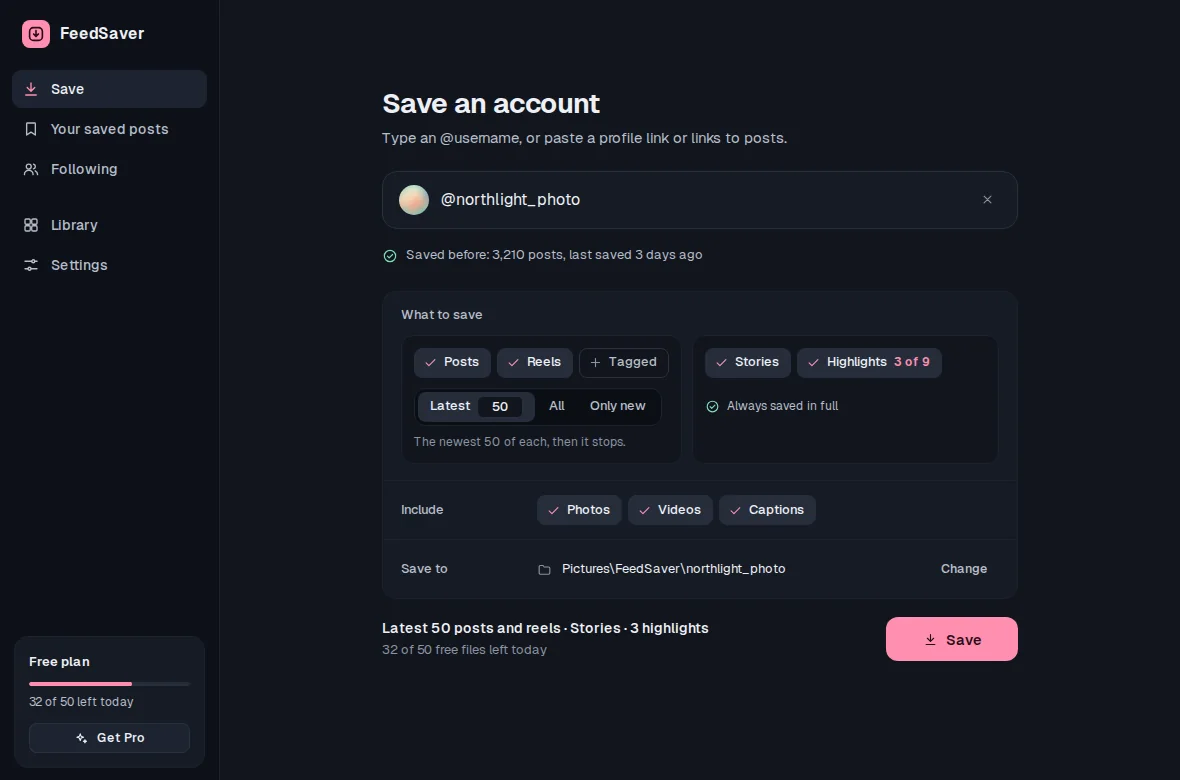
| Stories and highlights | Tick Stories and Highlights, and pick which highlights |
| Posts you were tagged in | Tick Tagged |
| Private accounts you follow | Yes, while you're logged in |
| Hashtags and locations | Not supported |
| Mac or Linux | Not available. FeedSaver is Windows only. |
FeedSaver also gives you things you may not have had before: the Reels and Reposts tabs, your own saved posts, each caption as a text file next to the post, and a library you can search by caption.
Switching, step by step
- Install FeedSaverDownload it for Windows 10 and 11. Keep your old Stogram folder where it is; nothing needs to be deleted.
- Log in to InstagramFeedSaver opens Instagram in its own window and you log in there. We never receive your password; the login session stays on your PC.
- Add the accounts you used to subscribe toType an
@username, choose All, tick Stories or Highlights if you want them, and save. - Next time, fetch only what's newChoose Only new for an account and it stops when it reaches posts you already have. With Pro, Update the accounts you follow does this for your Instagram following list, one account at a time.
What's different, honestly
- Your old Stogram library isn't imported. FeedSaver can't tell which of Stogram's files match which posts, so the first full download of an account saves it again into FeedSaver's folder. After that, updates only fetch new posts.
- No hashtag or location downloads. FeedSaver works with accounts and single posts.
- Updating many accounts in one run is Pro. On the free version, you bring accounts up to date one at a time with Only new. There's no separate subscription list: Pro's update uses your Instagram following list.
- Instagram sets the limits. It can limit accounts that download a lot, and it may not show every old post. FeedSaver paces itself, stops when Instagram asks it to pause, waits until you press Try again, and shows you what it skipped.
Common questions
Is FeedSaver made by the 4K Stogram team?
No. FeedSaver is an independent app. 4K Stogram is a product of its own developer, and we're not affiliated with them.
Can I keep using my Stogram folders?
Yes. They're ordinary files, and FeedSaver doesn't touch them. It saves into its own folder, so you can keep both.
Is it free?
Up to 50 files a day, on every download feature. Pro is $39, paid once, removes the limit and adds Update the accounts you follow. No subscription.