Instaloader is a free, actively maintained command-line tool, and its own Troubleshooting page covers login errors and 429 messages. FeedSaver is a separate Windows app that saves a whole Instagram profile, its stories and highlights, your saved posts, and later only the new posts. It runs on Windows 10 and 11.
What Instaloader's own troubleshooting page says
The project keeps a Troubleshooting page. When we read it on 12 November 2026 it had four sections:
- 429 Too Many Requests. Restarting Instaloader often in a short time is prone to cause a 429. The project advises using the current version. On a 429, Instaloader waits and retries by itself. Cloud, VPN and public proxy addresses may face stricter limits when not logged in.
- Too many queries in the last time. The project says this is not an error. It is a notice that the rate limit is almost reached.
- Private but not followed. You have to follow a private account to access most of its information.
- Login error. The project says login should work with and without two-factor authentication. On a checkpoint challenge, Instaloader points you to a URL to open in a browser. It recommends keeping the session file made by
--login. If there is no session file, the page offers a script that imports your login from Firefox.
That is a summary. Read the page yourself, and check it for anything newer. This guide does not diagnose individual error messages: for your exact message, look in the Instaloader issue tracker to see whether it is already reported.
FeedSaver is a separate app. It is not made by, or connected to, Instaloader's developers.
Stay with Instaloader if
Instaloader describes itself as "a tool to download pictures (or videos) along with their captions and other metadata from Instagram". It is free open-source software written in Python, installed with pip3 install instaloader and run from the command line. Stay with it if:
- You are comfortable with Python and the command line.
- You are on Mac or Linux.
- You need hashtags, comments or geotags.
- You want a free tool with no daily limit.
Instaloader GUI or standalone Windows app?
If you want a window instead of typing commands, there are two different kinds of option: a graphical front end for Instaloader, or a standalone Windows app such as FeedSaver. Each suits a different setup.
- A GUI front end for Instaloader is a program that puts a window and buttons on top of Instaloader itself, so Instaloader still does the downloading underneath. It suits you if you already use Instaloader and want a window over it.
- A standalone Windows app like FeedSaver is a separate program, not made by or connected to Instaloader's developers. It installs like any other Windows program, with no Python and no command line, and keeps its own library without using Instaloader's folders or session files. It suits you if you want a ready-to-run Windows app with nothing else to install.
The same jobs in FeedSaver, without the command line
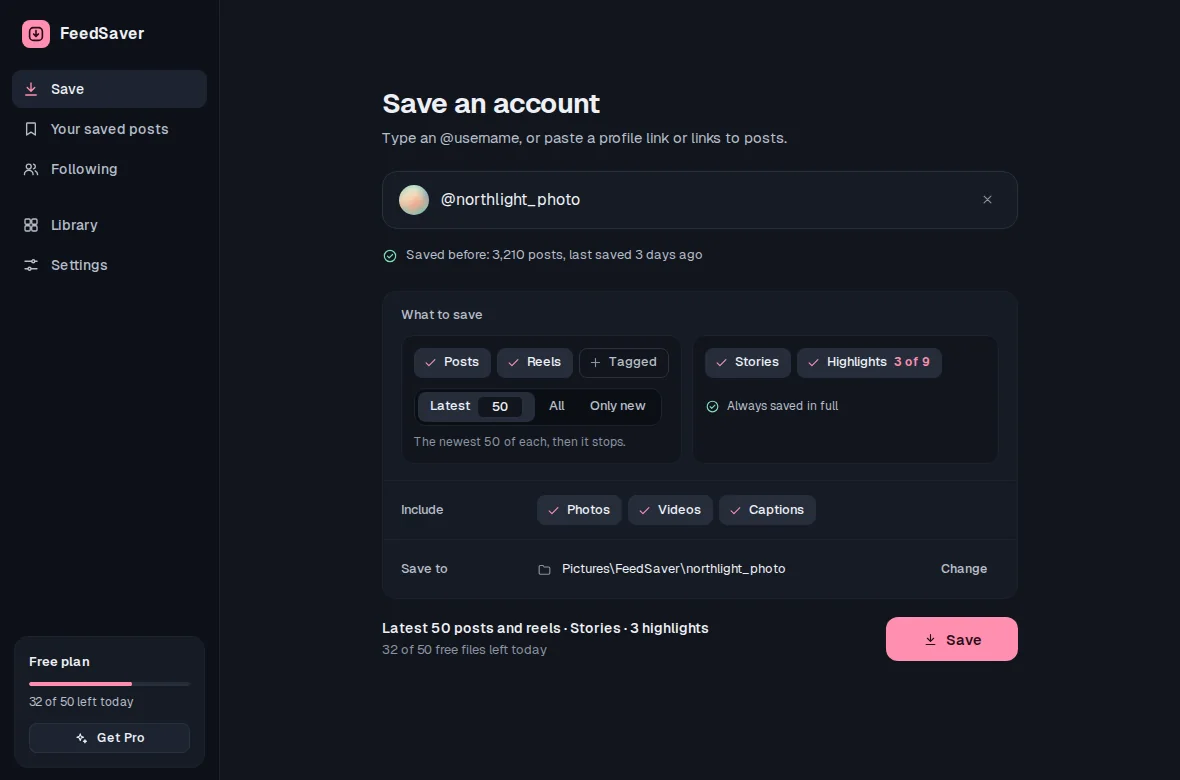
- A whole profile. Type the
@username, tick Posts, Reels, Reposts and Tagged as you like, and choose All. Each post's photos, videos and caption go into a folder named after the account. Full steps for a whole profile. - Stories and highlights. Tick Stories for the stories that are up right now, and Highlights, then pick which ones. More on highlights.
- Your own saved posts. Open Save my bookmarks to save the posts in your Instagram Saved list into one folder. How to save them all.
- Only the new posts, later. Save the account again and choose Only new. Files already saved are skipped. With Pro, Update the accounts you follow does this for your Instagram following list, one account at a time. More on Only new.
Getting started, step by step
- Install FeedSaverDownload it for Windows 10 and 11. There is no Python to install. Keep your Instaloader folders where they are; nothing needs to be deleted.
- Log in to InstagramFeedSaver opens Instagram in its own window and you log in there. We never receive your password; the login session stays on your PC.
- Add an accountType an
@username, tick what you want under What to save, choose All and click Save. - Next time, choose Only newType the same
@usernameand pick Only new to get just the posts that are new since last time.
What's different
- FeedSaver starts its own library. It does not import Instaloader's folders or session files. Your Instaloader folders stay untouched.
- No hashtag or location downloads, no comments, no geotags. FeedSaver works with accounts and single posts, and saves photos, videos and captions.
- No command line or scripting. Everything happens in the app window.
- Windows only. There is no Mac or Linux version.
- Free up to 50 files a day. Pro is $59, paid once. It removes the limit and adds Update the accounts you follow. No subscription.
- Private accounts can only be saved if you follow them and are logged in.
- Instagram sets the limits, for every tool. It can limit accounts that download a lot, and it may not show every old post. FeedSaver saves at a steady, natural pace, stops when Instagram asks it to pause, waits until you press Try again, and lists anything that isn't in the folder, with the reason.
- Windows may show a notice for new apps. Here is what to click.
Common questions
Is Instaloader still maintained?
Yes. Version 4.16 was released on 26 October 2026. Check the project's own pages for the latest.
Can I use Instaloader without Python or the command line?
Instaloader itself is a command-line tool and needs Python. If you want an ordinary Windows app instead, FeedSaver is a separate app that saves whole accounts from a window.
Does FeedSaver avoid 429 errors?
No tool is exempt. Instagram sets the limits. FeedSaver saves at a steady pace, stops when Instagram asks it to pause, and waits until you press Try again.
Can I keep my Instaloader folders?
Yes. They're ordinary files, and FeedSaver doesn't touch them. It saves into its own folder, so you can keep both.
Is it free?
Up to 50 files a day, on every download feature. Pro is $59, paid once, removes the limit and adds Update the accounts you follow. No subscription.