To download an entire Instagram profile at once, log in to Instagram in FeedSaver, type the account's @username, tick what to save, choose All and click Save. Everything goes into a folder named after the account on your PC. It runs on Windows 10 and 11.
What a bulk download saves
- Posts. Every photo and video, and every image in a carousel.
- Reels, Reposts and Tagged. Tick the tabs you want. Each gets its own subfolder.
- Stories and highlights. The stories that are up right now, and the highlights you pick. Highlights are saved in full.
- Captions. Each caption is saved as a text file beside its post, and every file name starts with the post date.
How to download all Instagram photos at once
- Install FeedSaver and log inIt runs on Windows 10 and 11. FeedSaver opens Instagram in its own window and you log in there. We never receive your password; the login session stays on your PC.
- Open Save an accountClick Save an account in the sidebar and type the account's
@username, or paste its profile link. - Tick what to saveUnder What to save, tick Posts, Reels, Reposts, Tagged, Stories and Highlights, whichever you want (you choose which highlights). Under Include, choose Photos, Videos and Captions.
- Choose All and click SavePhotos appear on a wall as they're saved, with posts, files and missing counts. You can stop at any time. If you close the app or reach the free daily limit, use Resume when saving is available again. If Instagram asks for a pause, use Try again when the app allows it.
- Later, fetch only what's newType the same
@usernameand choose Only new. It checks Posts, Reels, Reposts and Tagged for new posts. Stories and the Highlights you select are checked in full; files already saved are skipped. More in Download only new Instagram posts.
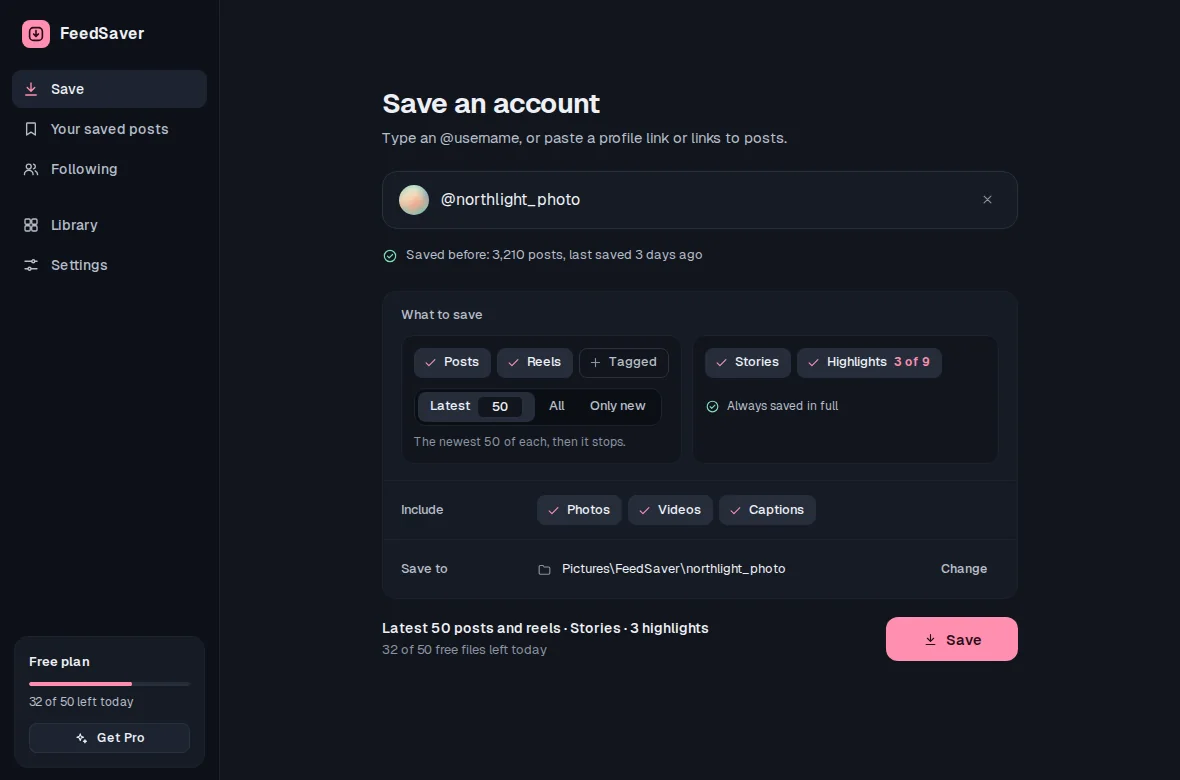
A longer walk-through is in How to download all photos from an Instagram profile to your PC.
The free limit, and Pro
The free version saves up to 50 files a day. Each photo, each video, each carousel image and each caption file is one file, and files that are already saved are skipped and don't count. At that rate a big account takes weeks on the free version, and you can resume where it stopped. Pro is $59, paid once, with no subscription. It removes the daily limit, adds Update the accounts you follow, and works on 2 PCs.
Browser extension or desktop app?
Both can save media from Instagram, in different ways. A browser extension adds a feature to your browser. A desktop app is a separate program on your PC.
With a desktop app like FeedSaver, you get:
- A library folder of its own. One folder per account, with dated file names and each caption as a text file beside its post, plus a library you can search by caption.
- A way back for later. Choose Only new and it fetches only the posts that are new since last time.
- Files that stay on your PC. FeedSaver talks to Instagram directly from your computer and doesn't upload your files anywhere.
The trade-off: FeedSaver is a Windows program you install. If you only want a single photo or video now and then, a browser extension or a website may be all you need. For a whole account kept in a folder you control and brought up to date later, use the app.
If you used the ESUIT browser extension, see what happened to it and how to switch to FeedSaver.
Good to know
- Big accounts take a while. Instagram can limit accounts that download a lot, so FeedSaver saves at a steady, natural pace. If Instagram asks for a pause, FeedSaver stops and waits until you press Try again. Everything saved so far stays in your folder.
- Instagram decides what's visible. Deleted, restricted or hidden posts can't be saved, and Instagram may not show every old post. FeedSaver shows what it saved and lists anything missing, with the reason.
- Private accounts can only be saved if you follow them and are logged in. A private account you don't follow can't be saved.
- Comments and likes aren't saved. You get the media, the caption and the post's date.
- Which Instagram account to use. See the FAQ.
- Windows may show a notice for new apps. Here is what to click.
Common questions
Can I download an entire Instagram profile at once?
Yes. Type the @username in FeedSaver, tick what you want, choose All and click Save. The free version saves 50 files a day and carries on where it stopped; Pro has no daily limit.
Do I need a browser extension?
No. FeedSaver is a Windows app. It opens Instagram in its own window and you log in there.
Can I bulk download several accounts?
Yes, one after another. You can also paste a list of post links. With Pro, Update the accounts you follow goes through your Instagram following list, one account at a time, and saves what's new.
Will running it again download everything twice?
No. Files that are already saved are skipped, and they don't count toward the free limit. Choose Only new to check for new posts.