4K Stogram's developer says the app has been discontinued and gets no more updates, bug fixes or support. FeedSaver is a separate, newer Windows app that saves a whole Instagram profile, its stories and highlights, your saved posts, and later only the new posts. It runs on Windows 10 and 11.
Why 4K Stogram stopped working
On its own page, Why is 4K Stogram discontinued?, the developer says it can no longer guarantee the app's proper functionality because of Instagram's increasing restrictions and unpredictable way of operation. It also says:
- 4K Stogram gets no more updates, bug fixes, new features or user support.
- The existing version stays available to download and use. The 4K Stogram product page shows which version is the latest, and when it came out.
- Licences are no longer on sale, so a new user only gets the free version. Premium stays for people who bought a licence before.
In practice, when Instagram changes how its login or pages work, an app that is no longer updated cannot follow, and nobody will fix it. That is a summary of the developer's page, so read it yourself and check it for anything newer. FeedSaver is a separate, newer app, not made by or connected to the makers of 4K Stogram.
Quick checks before you give up on it
If 4K Stogram will not log in or has stopped refreshing accounts, these are safe things to try. None of them is guaranteed to help, because the app is no longer maintained.
- Check your version. Compare the version in 4K Stogram with the latest one on the product page.
- Open Instagram in your normal web browser. If Instagram asks for a verification code or shows a warning, deal with that there first, rather than retrying inside 4K Stogram.
- Close the app completely and give it a rest. Then try once more. Repeated quick login attempts are more likely to bring Instagram's own checks than to fix anything.
- Look at 4K Download's help pages. Active support has ended, but its help page and the discontinuation FAQ above are still online.
If none of that works, stop retrying: the developer's own reason for discontinuing it is the safety of your Instagram account. Your existing downloads are ordinary files and are not affected; see what to do with your old Stogram folders.
What still works today
Other tools cover different parts of what 4K Stogram did. The 4K Stogram alternative guide has the full comparison table; in short:
- Desktop apps with a normal window. FeedSaver (Windows 10 and 11), and WFDownloader App (Windows, Mac and Linux).
- Command-line tools. Instaloader and gallery-dl are free, open-source and run on Windows, Mac and Linux. They suit people who are comfortable in a terminal. If you already use Instaloader and hit errors, see Instaloader not working.
- Browser extensions. They suit saving the odd post or Reel while you browse. Each is made by its own developer, so check what it covers, and who makes it, before you install it.
- Instagram's own export. It backs up your own account only. See Meta's help page on exporting your information.
Instagram's limits apply to every one of these tools, ours included.
A 4K Stogram alternative in 2026: the same jobs in FeedSaver
- A whole profile. Type the
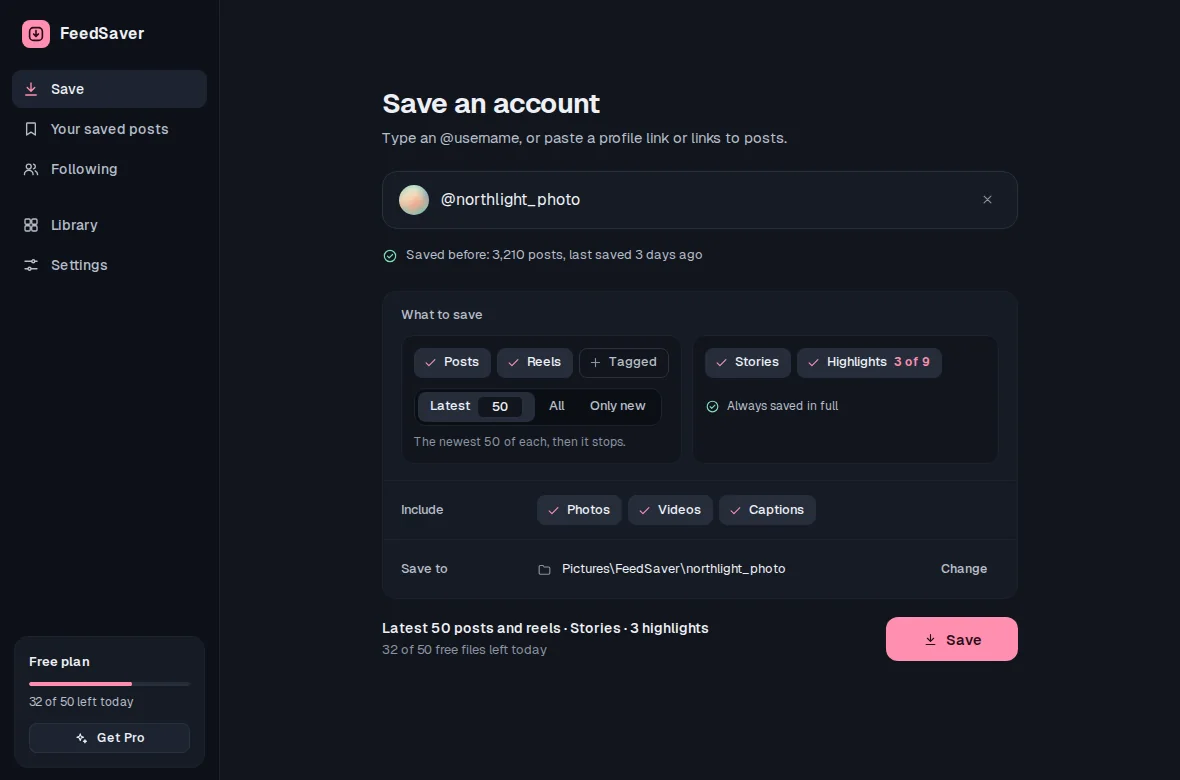
@username, tick Posts, Reels, Reposts and Tagged as you like, and choose All. Each post's photos, videos and caption go into a folder named after the account. Full steps for a whole profile. - Stories and highlights. Tick Stories for the stories that are up right now, and Highlights, then pick which ones. Highlights are saved in full. More on highlights.
- Your own saved posts. Open Save my bookmarks to save the posts in your Instagram Saved list into one folder. How to save them all.
- Only the new posts, later. Save the account again and choose Only new. It checks Posts, Reels, Reposts and Tagged for new posts. Stories and the Highlights you select are checked in full; files already saved are skipped. With Pro, Update the accounts you follow does this for your Instagram following list, one account at a time. More on Only new.
For a side-by-side table of what you did in 4K Stogram and where it is in FeedSaver, see A 4K Stogram alternative for Windows.
Moving to FeedSaver, step by step
- Install FeedSaverDownload it for Windows 10 and 11. Keep your old 4K Stogram folder where it is; nothing needs to be deleted.
- Log in to InstagramFeedSaver opens Instagram in its own window and you log in there. We never receive your password; the login session stays on your PC.
- Add an accountType an
@username, tick what you want under What to save, choose All and click Save. - Next time, choose Only newType the same
@usernameand pick Only new to get just the posts that are new since last time.
What's different
- FeedSaver starts its own library. It does not import 4K Stogram's files, and it has its own free version and its own Pro. The first full save of an account goes into FeedSaver's folder, with captions and dates.
- No hashtag or location downloads. FeedSaver works with accounts and single posts.
- Windows only. There is no Mac or Linux version.
- Free up to 50 files a day. Pro is $59, paid once. It removes the limit and adds Update the accounts you follow. No subscription.
- Private accounts can only be saved if you follow them and are logged in.
- Instagram sets the limits. It can limit accounts that download a lot, and it may not show every old post. FeedSaver saves at a steady, natural pace, stops when Instagram asks it to pause, waits until you press Try again, and lists anything that isn't in the folder, with the reason.
- Windows may show a notice for new apps. Here is what to click.
Common questions
Is 4K Stogram discontinued?
Its developer says so on its own page, Why is 4K Stogram discontinued?. Read it there for the details.
Can I still download 4K Stogram?
The developer says the existing version stays available to download and use, with no further updates, fixes or support. It also says licences are no longer on sale, so new users only get the free version. Check its page for the latest.
Why won't 4K Stogram log in to Instagram?
Its developer says it can no longer guarantee the app works, because of Instagram's increasing restrictions, and that it gets no more updates or fixes. So a login problem caused by a change on Instagram's side will not be patched. Sign in to Instagram in your normal browser first, to make sure Instagram is not waiting for a confirmation on your account.
Is FeedSaver made by the 4K Stogram team?
No. FeedSaver is an independent app. 4K Stogram is a product of its own developer, and we're not affiliated with them.
Can I keep my old 4K Stogram folders?
Yes. They're ordinary files, and FeedSaver doesn't touch them. It saves into its own folder, so you can keep both.
Can I import my 4K Stogram subscriptions into FeedSaver?
No, FeedSaver doesn't read Stogram's files or subscription list. You add accounts by @username, or, with Pro, use Update the accounts you follow, which works from your Instagram following list so there's no second list to keep.
Will a different downloader avoid Instagram's limits and login checks?
No tool is exempt: Instagram sets its own limits and checks for every downloader, ours included. FeedSaver saves at a steady, natural pace, stops when Instagram asks it to pause, and waits until you press Try again.
Is it free?
Up to 50 files a day, on every download feature. Pro is $59, paid once, removes the limit and adds Update the accounts you follow. No subscription.