Log in to Instagram in FeedSaver with the account that saved the posts, open Save my bookmarks in the sidebar, choose All and click Save. The posts go into one folder, and each file name starts with the original poster's @username.
Before you start
- The account that saved them. A Saved list belongs to the Instagram account that saved the posts, so FeedSaver needs that account's login. A second account only helps if it has a saved list of its own. The page shows which account you're logged in with.
- The daily limit. The free version saves up to 50 files a day. Each photo, each video, each carousel image and each caption file is one file. A long list takes a few days on the free version, and you can resume where it stopped. Pro ($59, paid once) removes the limit.
- It only reads your list. Saving doesn't remove or change anything in your Saved list on Instagram.
Step by step
- Install FeedSaver and log inIt runs on Windows 10 and 11. FeedSaver opens Instagram in its own window and you log in there with the account that saved the posts; we never receive your password.
- Open Save my bookmarksClick Save my bookmarks in the sidebar. The page shows the
@usernameyou're logged in with. Click Check count to see how many posts are in your Saved list. - Choose how far backPick Latest and a number (the posts you saved most recently), All, or Only newly saved for a list you've saved from before.
- Pick what to includeUnder Include, choose Photos, Videos and Captions. Each caption is saved as a text file beside its post.
- Click SavePhotos, videos and every image in a carousel are saved. You can stop at any time, and if a save stops, Resume carries on where it left off, even after you close the app.
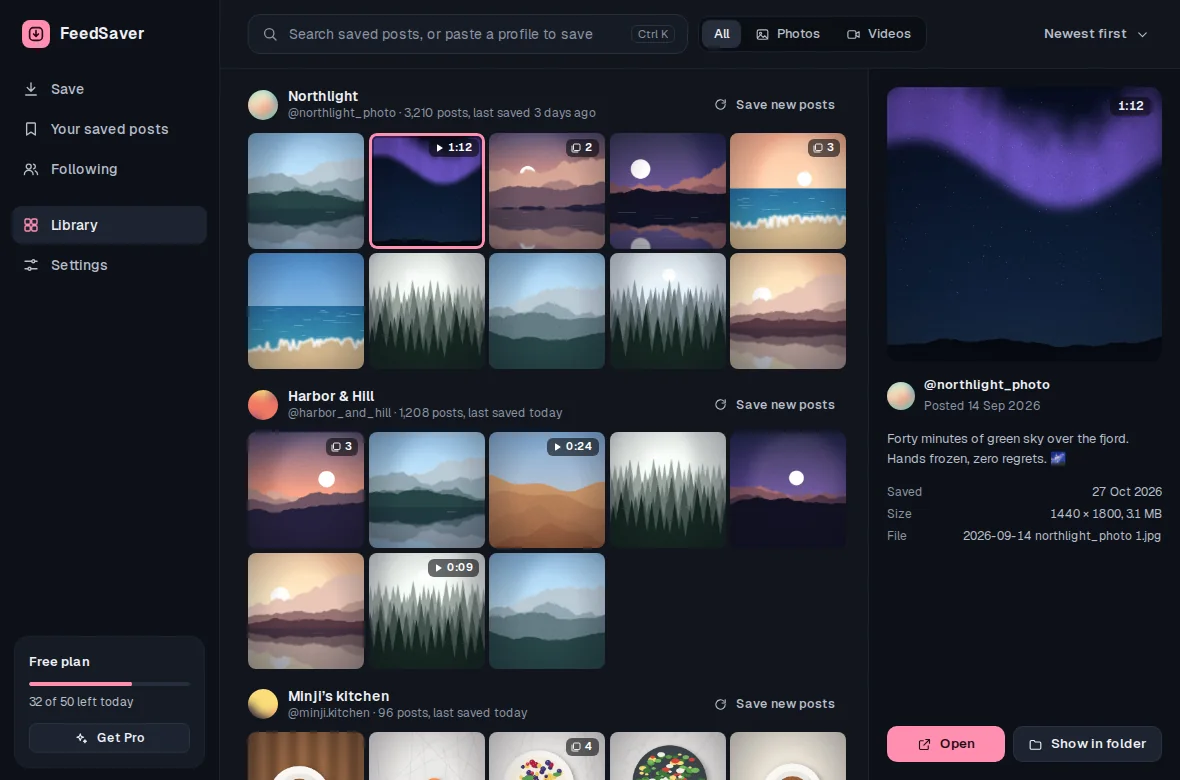
What you get on your PC
One folder called Your saved posts, inside your save folder (by default Pictures\FeedSaver). Each file name starts with the original poster's @username, then the post date, so you can tell whose post it is. A carousel's images are numbered, and each caption sits beside its post as a text file. Everything also appears in the FeedSaver library.
Your saved posts/
  northlight_photo_2026-09-29_C7mQx2LpA1d_01.jpg   photo 1
  northlight_photo_2026-09-29_C7mQx2LpA1d_02.jpg   photo 2
  northlight_photo_2026-09-29_C7mQx2LpA1d.txt      caption
Good to know
- Collections aren't kept. FeedSaver doesn't recreate your Instagram collections: all your saved posts go into one folder.
- Only what Instagram still shows. Posts that have been deleted, restricted or hidden by their owner can't be saved, and Instagram may not show every old post. FeedSaver shows what it saved and lists anything missing, with the reason.
- Big lists take a while. Instagram can limit accounts that download a lot, so FeedSaver saves at a steady, natural pace. If Instagram asks for a pause, FeedSaver stops and waits until you press Try again. Everything saved so far stays in your folder.
- Saved posts belong to the people who posted them. Keep them for your own reference, and ask before you reuse them anywhere.
Common questions
Can I download all my Instagram saved posts at once?
Yes. Open Save my bookmarks in FeedSaver and choose All. The free version saves 50 files a day and carries on where it stopped; Pro has no daily limit.
Does it keep my collections?
No. All your saved posts go into one folder, with the original poster's name at the start of each file name.
Can I use a different account to save my list?
Only the account that saved the posts can read its Saved list, so log in with that account. A second account works only for the posts it has saved itself.
Will it save posts I save later?
Yes. Next time, choose Only newly saved. Posts that are already in your folder are skipped, so you only fetch what you've saved since.
Does saving remove posts from my Saved list?
No. FeedSaver only reads your Saved list. It doesn't change it on Instagram.