Use Instagram's free data download for a one-off copy of your own data, and FeedSaver for a backup you can browse, search and keep up to date. Log in, type the @username, tick what you want, choose All and click Save. Next time, choose Only new.
Two ways to back up, and when to use each
| Instagram's download | FeedSaver | |
|---|---|---|
| Photos and videos | Yes | Yes |
| Captions and dates | In separate data pages | Beside each photo |
| A library you can search | No | Yes |
| Messages and comments | Yes | No |
| Archived stories | Yes, if you choose them | No |
| Other accounts | Your own account only | Any account your login can see |
Many people do both: the data download once, for messages and comments, and FeedSaver for the photo library they keep using. The steps for Instagram's download are in our guide to saving everything before you delete your account.
Step by step with FeedSaver
- Install FeedSaver and log inIt runs on Windows 10 and 11. FeedSaver opens Instagram in its own window and you log in there; we never receive your password.
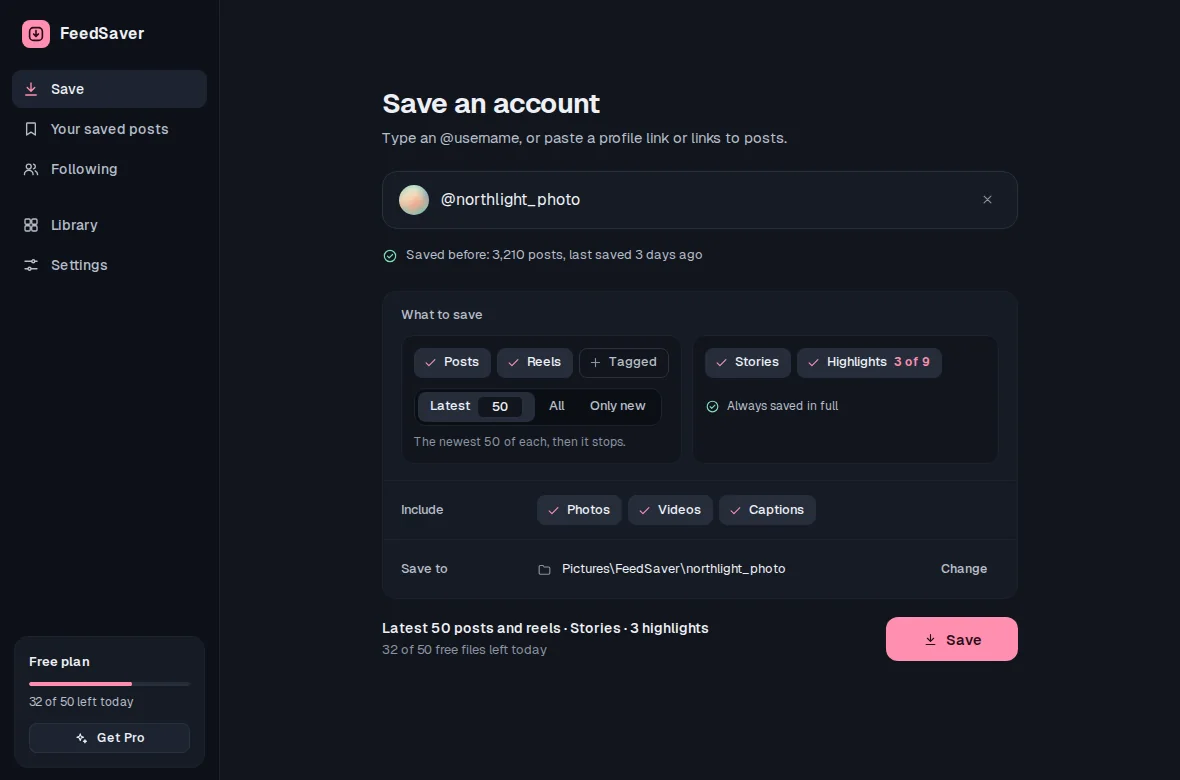
- Open Save an accountClick Save an account in the sidebar and type the account's
@username, or paste its profile link. - Tick what to back upUnder What to save, tick Posts, Reels, Reposts, Tagged, Stories and Highlights, whichever you want (you choose which highlights). Under Include, keep Captions ticked.
- Choose All and click SaveIf you close the app or reach the free daily limit, use Resume when saving is available again. If Instagram asks for a pause, use Try again when the app allows it.
- Keep it currentOnce a week or once a month, open Save an account, type the same
@usernameand choose Only new. Only new checks Posts, Reels, Reposts and Tagged for new posts. Stories and the Highlights you select are checked in full; files already saved are skipped. More in Download only new Instagram posts.
Where your backup lives
On your PC, in a folder you choose (by default Pictures\FeedSaver), with one folder per account. Each file name starts with the post date, so the folder sorts in order, and each caption sits beside its post as a text file. Reels, Reposts, Tagged, Stories and Highlights each get a subfolder, and everything also shows in the FeedSaver library. For a second copy, copy the whole folder to an external drive or to cloud storage you trust. Copy it rather than move it: the library expects to find the files where FeedSaver saved them.
Good to know
- Stories are only up for 24 hours. FeedSaver can save only the stories that are still up. For a story backup, save regularly, or add them to a highlight.
- It doesn't save everything. FeedSaver doesn't save messages, drafts, comments or archived stories. Instagram's own download is for messages and comments.
- Instagram sets the pace. Instagram can limit accounts that download a lot, so FeedSaver saves at a steady, natural pace. If Instagram asks for a pause, FeedSaver stops and waits until you press Try again. Everything saved so far stays in your folder.
- For businesses and agencies. Commercial use is allowed. Back up accounts you own or are allowed to manage.
Common questions
How do I back up my whole Instagram account to my computer?
Install FeedSaver, log in, open Save an account, type your @username, tick all the sources and Captions, choose All and click Save. For messages and comments, also request Instagram's own data download: in Accounts Center, open Your information and permissions, then Download your information.
How often should I update the backup?
As often as you post. Only new checks Posts, Reels, Reposts and Tagged for new posts. Stories and the Highlights you select are checked in full; files already saved are skipped.
Can I back up an account I manage for a client?
Yes, if you're allowed to manage it and can see it with your login. Commercial use is allowed, and Pro works on 2 PCs.
Is the free version enough for a backup?
For a small account, often yes: it saves 50 files a day and carries on where it stopped. For a large account, Pro ($59, paid once) removes the daily limit.
Does FeedSaver upload my files anywhere?
No. Your files stay on your PC. FeedSaver talks to Instagram directly from your computer.